TERRA on the phone

Read the land you are standing on.

The GPS puts the pin under your feet. TERRA reads the square kilometre around it from orbit and returns the verdict with its evidence, in under a minute.

QR code for read.dearwise.earth/app

Scan with your phone’s camera

TERRA opens in the phone’s browser, ready to add to the Home Screen.

read.dearwise.earth/app

Open the app in this browser →

Coming soon to theApp Store

Free to read. The first reading asks for your email once.

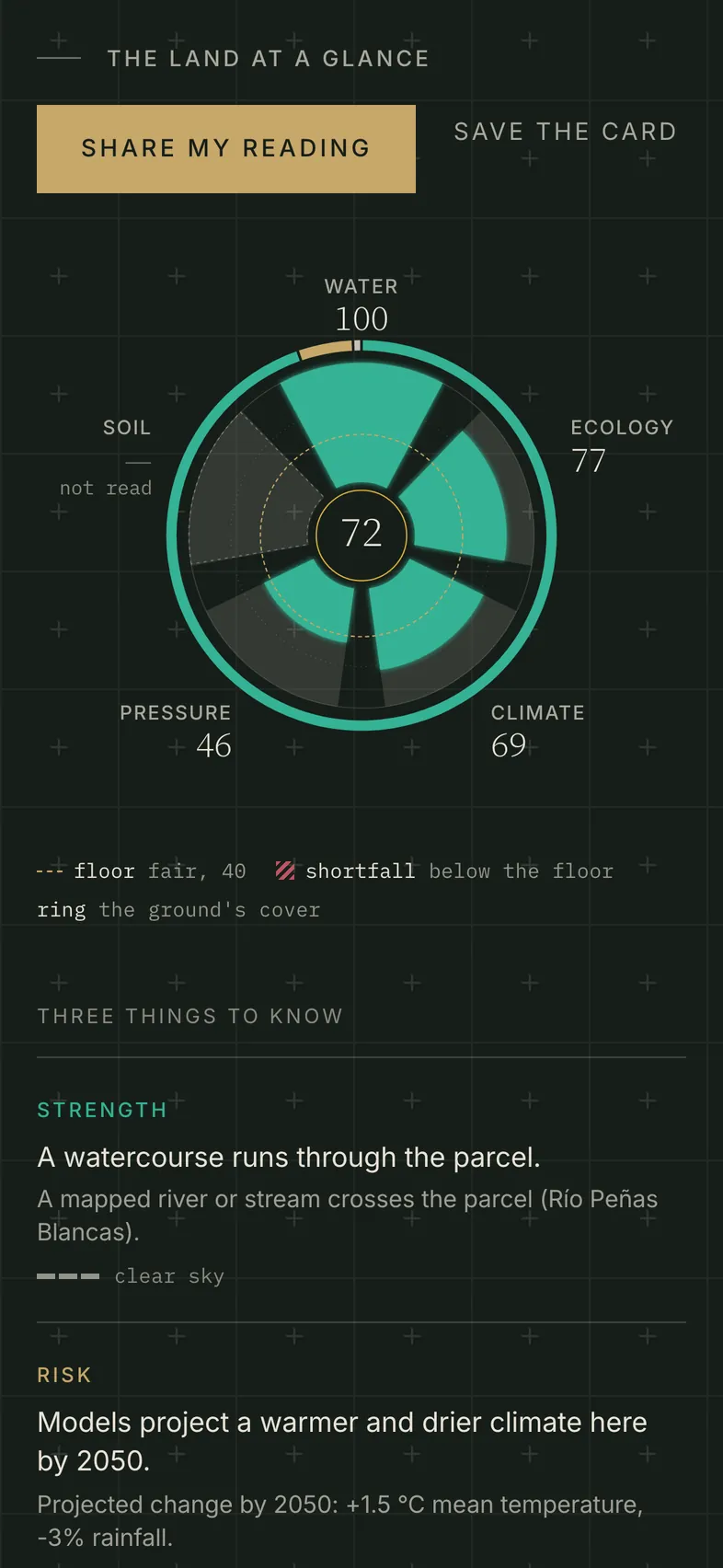
TERRA on a phone: the Monteverde ridge worked example, a score of 72 drawn at the centre of its five pillars, and the first of three things to know: A watercourse runs through the parcel.
The Monteverde ridge worked example, opened in the app · 29 Sept 2026

On the phone

1 km²
read around the pin
3 corners, 1 ha
the smallest walked boundary it reads
±25 m
the GPS fix a corner needs
100
readings kept on the phone
600
map tiles kept for the field

Screen by screen

Three tabs along the bottom, and field notes under every reading.

01Read here

One tap on the ground under your feet.

Open TERRA and the map flies to where you stand. The pin sits under the crosshair with a square kilometre drawn around it. Tap Read the land here and the reading arrives in under a minute: the score, the verdict, and the strength, the risk and the unknown behind it.

1 km² around the pin · On Android, press and hold the icon for Read where I stand
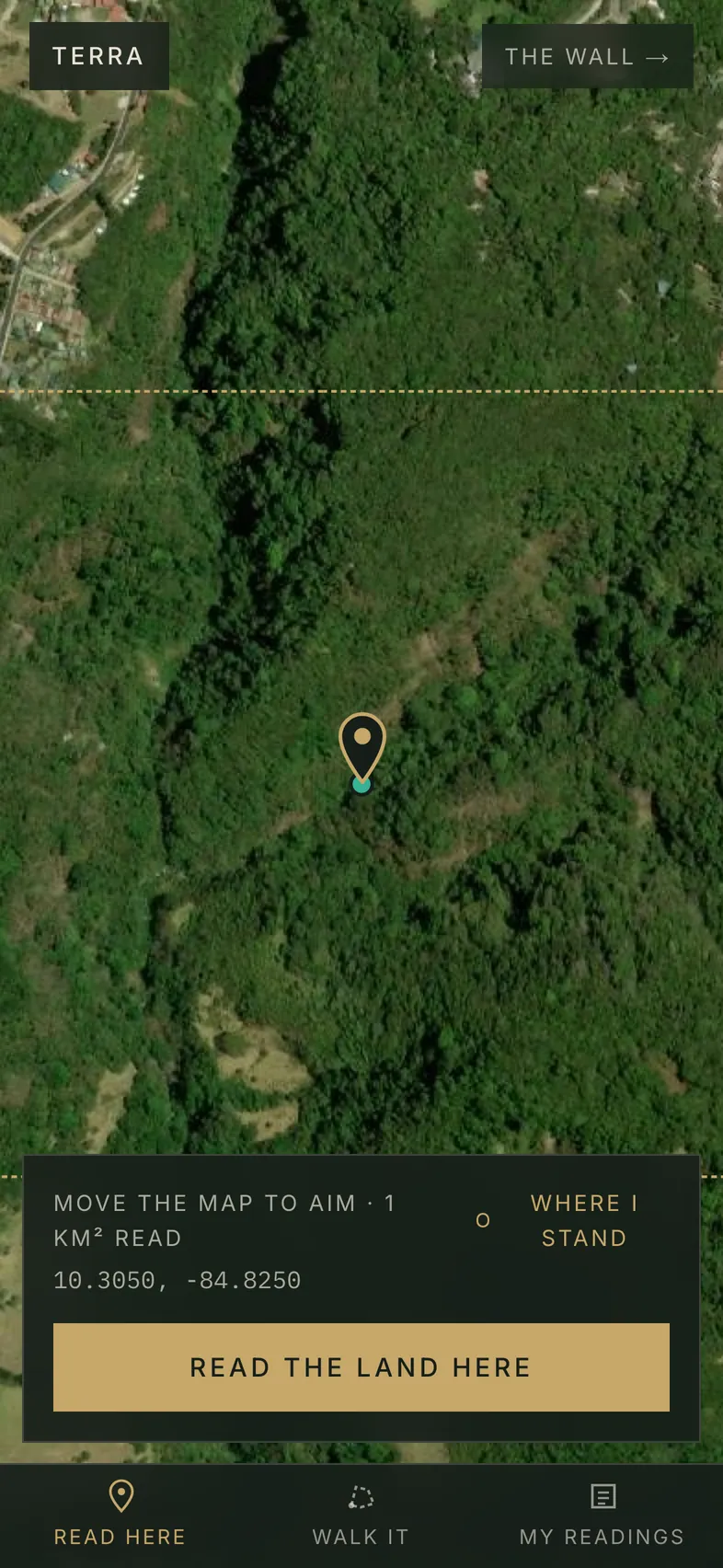
The Read here tab: the satellite map near Monteverde, the pin under the crosshair, the square kilometre it will read, and the Read the land here button.
Read here, near Monteverde, Costa Rica

02Walk it

Walk the fence line and read what you walked.

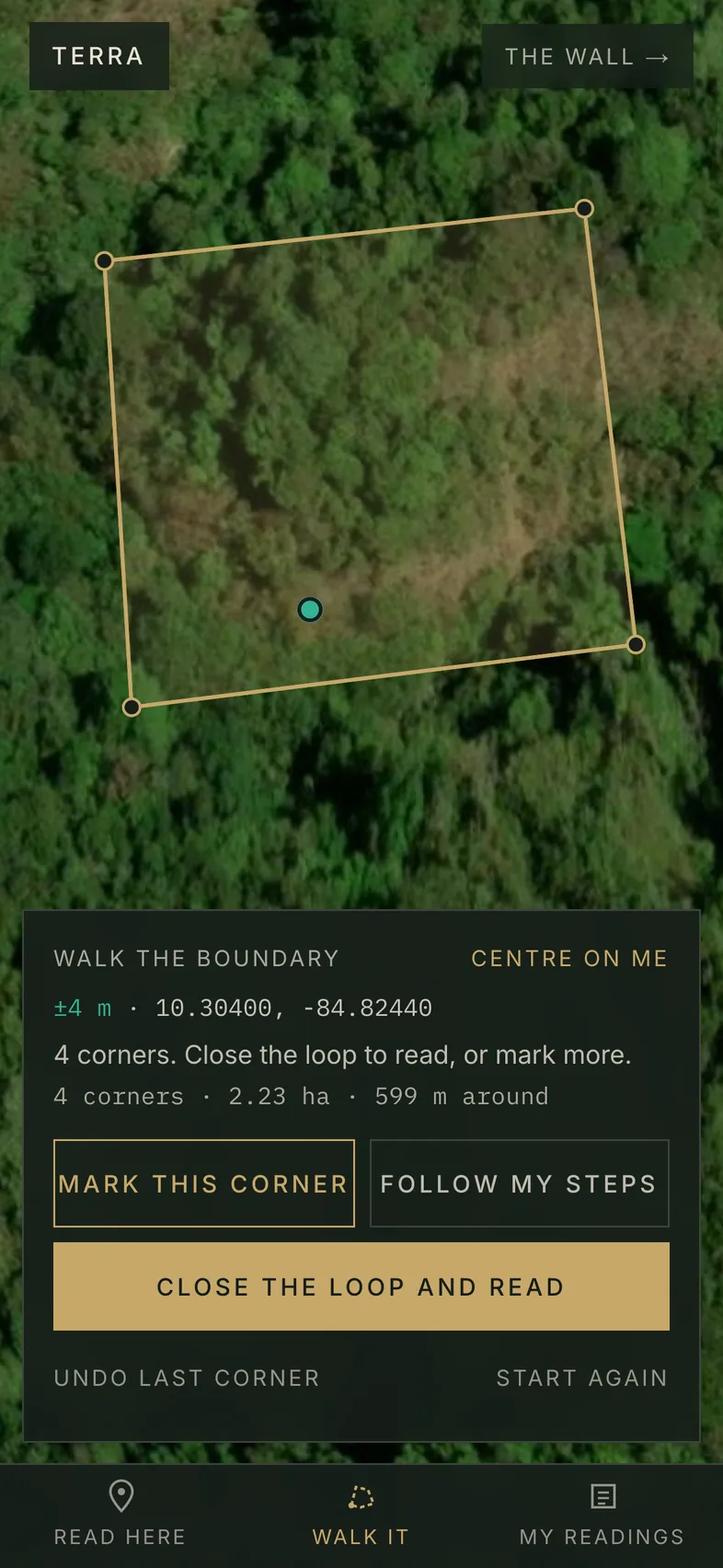
Stand on a corner and tap Mark this corner, or let Follow my steps lay the line as you go. The sheet keeps count of corners, hectares and metres around. Close the loop and TERRA reads the ground inside the line you marked.

From 3 corners and 1 ha · a corner needs a GPS fix of ±25 m or better · On Android, press and hold the icon for Walk a boundary

The Walk it tab: a boundary of 4 corners · 2.23 ha · 599 m around drawn in gold over the satellite map, with Mark this corner, Follow my steps and Close the loop and read.
Walk it, 4 corners · 2.23 ha · 599 m around. Corners placed by coordinate for this capture.

03Field notes · in every reading

Add what the satellite cannot see.

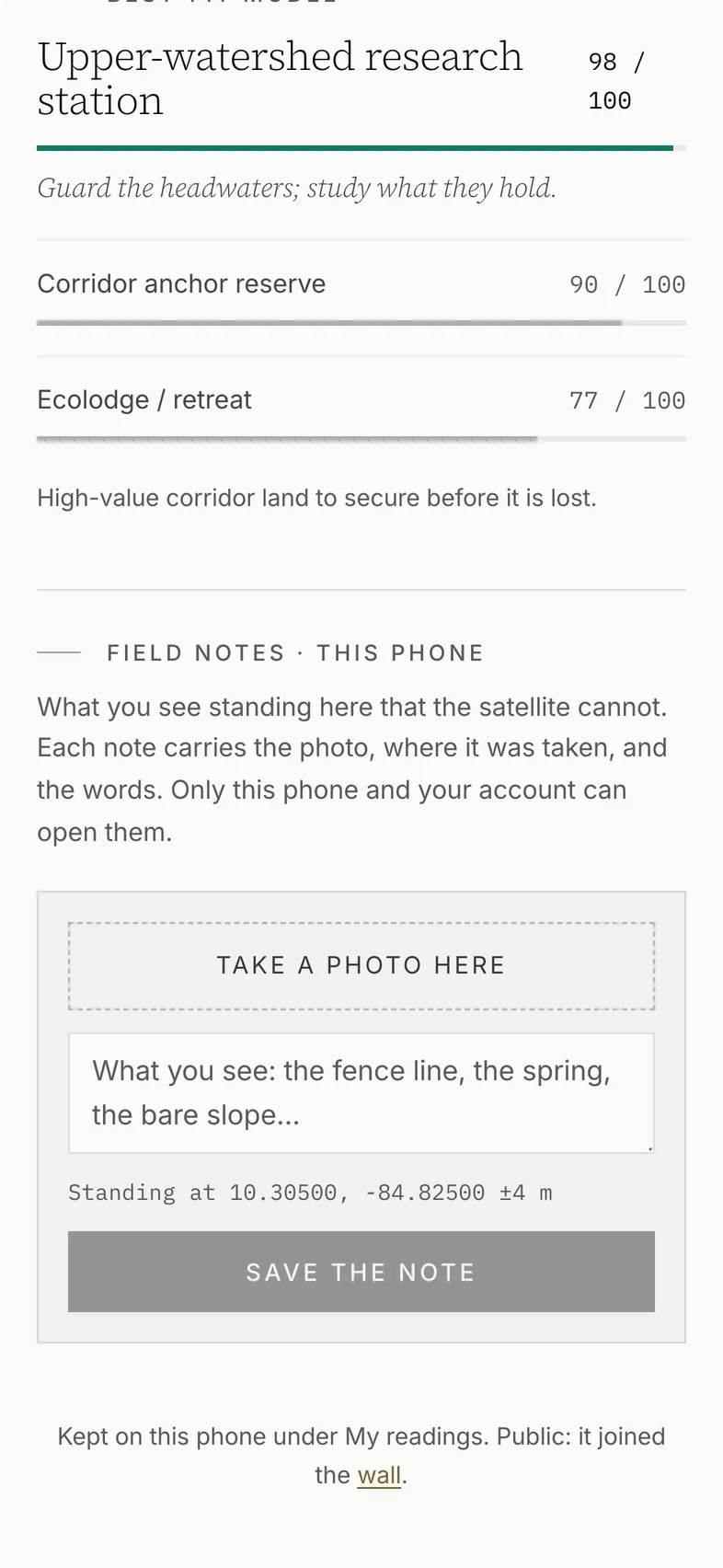
Under every reading on the phone, Take a photo here opens the camera. The note keeps the photo, where you stood with its GPS accuracy, and which way you faced, beside the reading it belongs to. Only this phone and your account can open it.

A note saves when the phone has signal.

Photos are made smaller on the phone before they are sent

Field notes under a reading: Take a photo here, a line for what you see, and the position the note will carry.
Field notes under the Monteverde reading, before a photo

04My readings

The readings stay open where the signal ends.

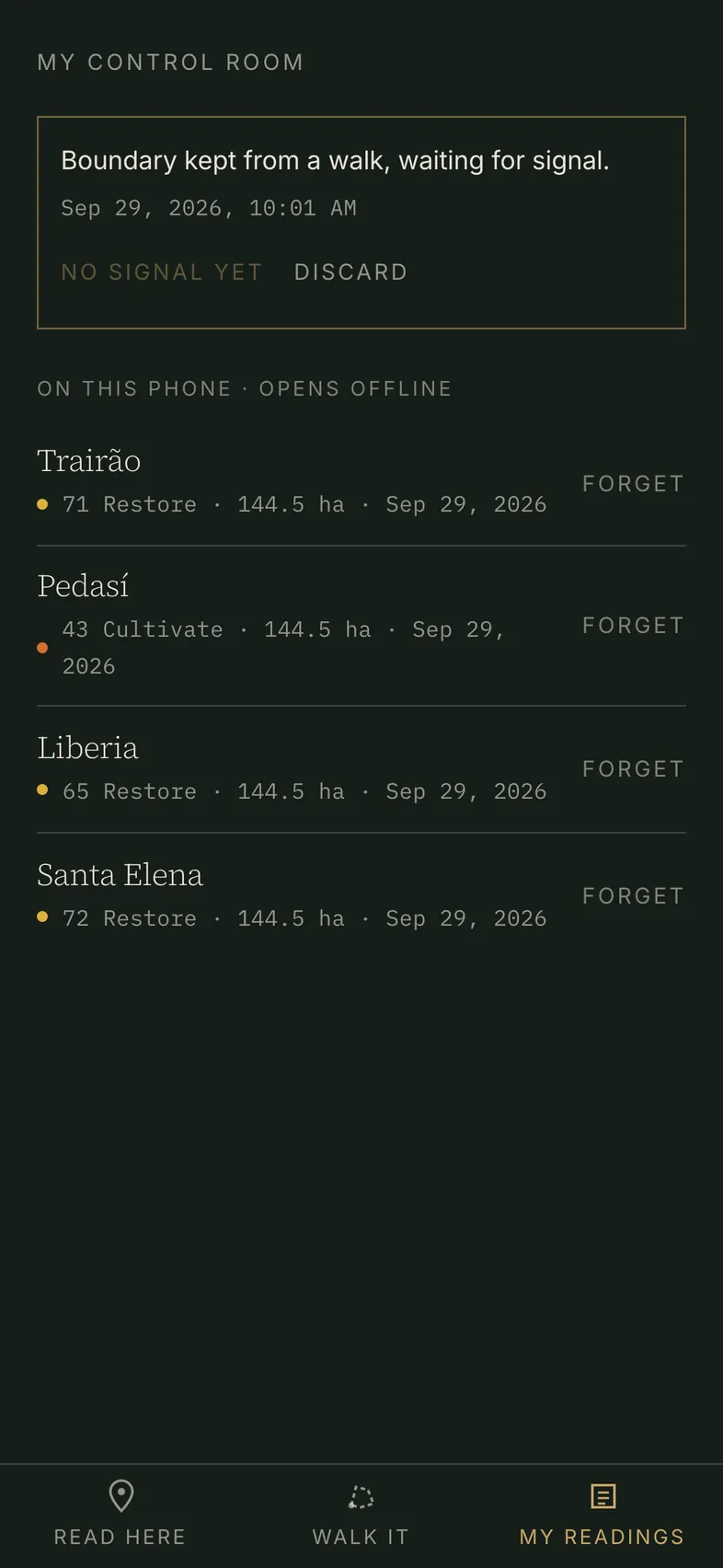
Every reading the phone makes or opens is kept on it, and opens with no signal under My readings. Walk a boundary where the signal has gone and TERRA keeps it, then reads it as soon as the phone is back online. The map keeps the ground you have already looked at.

A new reading, a field note and the readings held on your account need signal.

100 readings kept on the phone · the last 600 map tiles · On Android, press and hold the icon for My readings

My readings with no signal: a walked boundary waiting for signal, and four readings kept on the phone that open offline.
My readings with the signal off: the four worked examples and one walked boundary, kept on this phone

Every screen on this page is the app itself, captured at 393 × 852 points on 29 Sept 2026 with the position set near Monteverde, Costa Rica. The walk’s corners were placed by coordinate for the capture.

Put it on the phone

Add TERRA from the browser, on iPhone or Android.

QR code for read.dearwise.earth/app

Scan with your phone’s camera

TERRA opens in the phone’s browser, ready to add to the Home Screen.

read.dearwise.earth/app

Open the app in this browser →

On iPhone

  1. Scan the code with the camera, or type read.dearwise.earth/app into Safari.
  2. Tap Share. It sits under the three-dot menu beside the address, or in the bottom bar on earlier versions of iOS.
  3. Choose Add to Home Screen. Leave Open as Web App on and tap Add.

Chrome, Edge and Firefox on iPhone add it the same way, from their Share menu.

Coming to the App Store. Until then, the Home Screen app is this same TERRA.

On Android

  1. Scan the code with the camera, or type read.dearwise.earth/app into Chrome.
  2. Tap Install TERRA when Chrome offers it, or open the menu the three-dot menu and tap Install app.

Other browsers call it Add to Home screen.

Coming soon to theApp Store

App Store is a trademark of Apple Inc., registered in the U.S. and other countries and regions.